Work Program Menu
Overview
The Coordinator Work Program Menu serves as the central hub for all operational and administrative functions related to the student work program. This streamlined interface provides coordinators with organized access to program management, oversight functions, and administrative coordination tools.
Getting Started
Access this page through the Coordinator main menu by navigating to Finance Office > Work Program. The page provides a clean, organized layout focused on program operations and administrative coordination.
Page Structure and Navigation
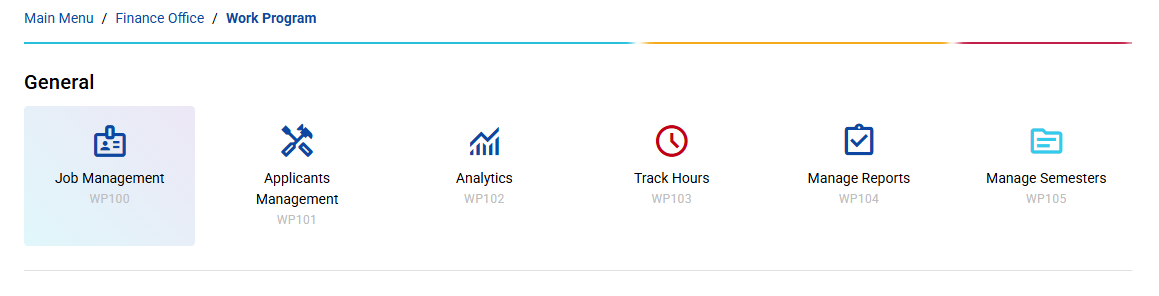
Breadcrumb Navigation
Clear hierarchical navigation showing your current location:
- Main Menu: Return to employee main dashboard
- Coordinator: Access to general coordinator functions
- Work Program: Current location for work program coordination operations
Menu Organization
The page uses a dynamic menu system that organizes coordination functions into logical groups, each displayed as interactive cards for easy access.
Key Differences from Employee Interface
Simplified Design Focus
Unlike the employee work program menu with its comprehensive dashboard cards, the coordinator interface prioritizes:
- Clean Layout: Minimalist design focused on essential coordination functions
- Menu-Driven Navigation: Organized by functional categories
- Professional Appearance: Coordinator-specific visual design
No Summary Dashboard
The coordinator interface does not include the real-time summary cards found in the employee version:
- No Applications Counter: Coordinators focus on program oversight rather than metrics
- No Approval Statistics: Approval processes are handled by supervisors
- No Real-Time Hours: Live tracking is supervisor responsibility
- Focused Functionality: Only coordination-relevant operations
Best Practices for Coordinators
Daily Operations
- Start with Current Period: Focus on current payroll period
- Review Pending Items: Check for items requiring attention
- Process Systematically: Handle items in priority order
- Verify Calculations: Double-check all financial calculations
- Document Actions: Maintain proper audit trails
Monthly Procedures
- Month-End Processing: Complete monthly payroll cycles
- Report Generation: Prepare required financial reports
- Account Reconciliation: Reconcile all work program accounts
- Budget Analysis: Review program costs against budget
- Archive Records: Proper retention of financial records
Quality Assurance
- Verification Procedures: Always verify calculations and data
- Approval Workflows: Follow proper approval chains
- Documentation Standards: Maintain complete documentation
- Error Resolution: Quickly address and resolve discrepancies
This finance-focused work program menu provides a professional, efficient interface for managing all financial aspects of the student work program while maintaining integration with the broader institutional financial systems.