Job List
Overview
The Job List page allows students to browse available work program positions, view detailed job information, and submit applications directly through the system.
How to Access
Navigation Path: Main Menu → Work Program Menu → Job List
Page Features
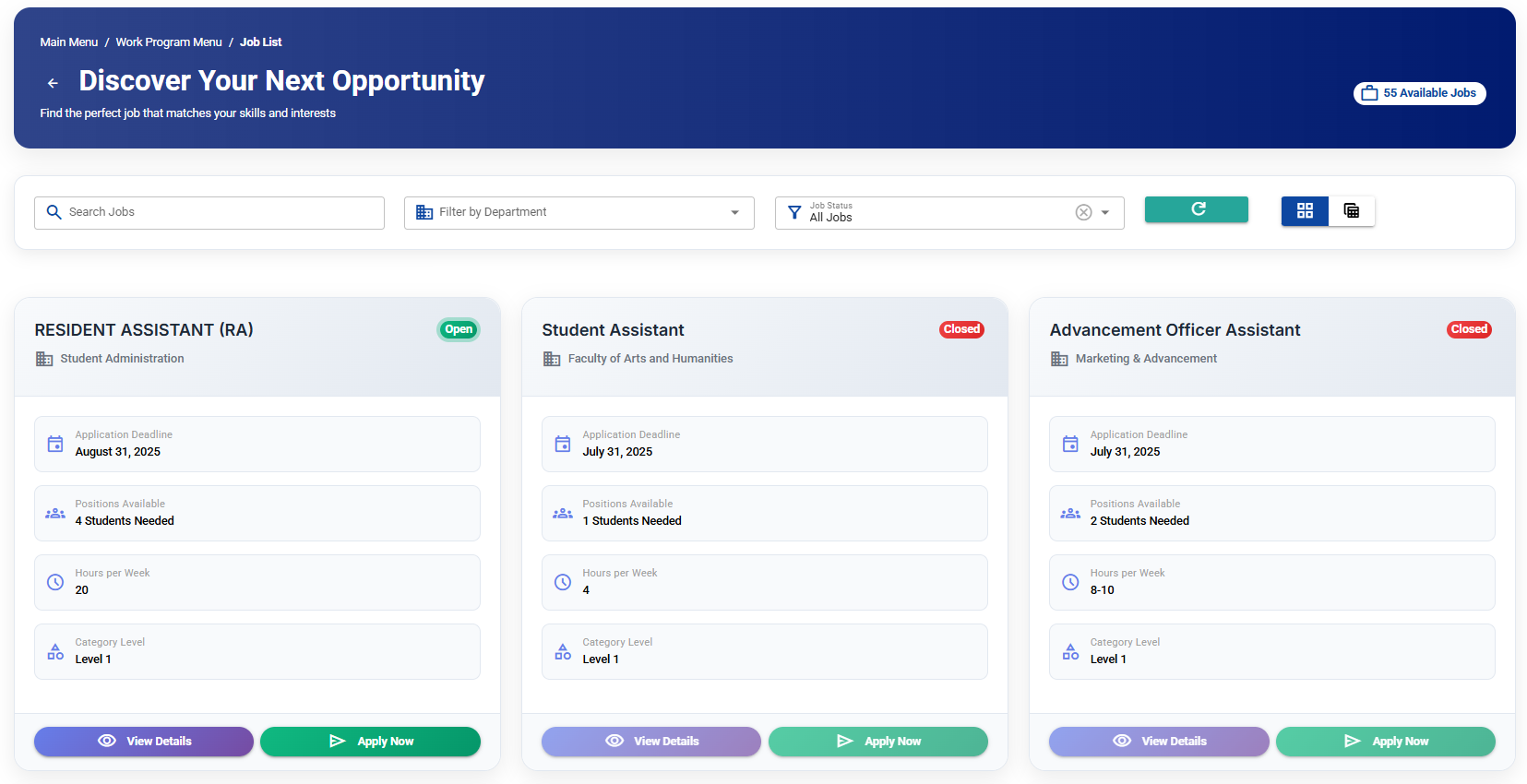
Search and Filter
- Search Jobs: Use the search box to find positions by title or department
- Department Filter: Filter jobs by specific departments using the dropdown
- Real-time Results: Search updates automatically as you type (300ms delay)
Job Display
Jobs are displayed as cards showing:
- Job Title and Department
- Status with color coding:
- 🟢 Open (Green) - Available for applications
- 🔴 Closed (Red) - No longer accepting applications
Available Actions
View Details Button
- Click Details to see complete job information:
- Department and category
- Job description
- Location and requirements
- Application deadline
- Hours per week
Apply Button
- Click Apply to submit your application
- Note: Apply button is disabled for closed positions
- Opens a comprehensive application form
📝 Application Process
When you click Apply, you'll see a form with:
Pre-filled Information
- Position and department
- Current semester and school year
- Your name, ID number, major, and class
Required Information to Complete
- Contact Details: Email, mobile phone, telephone
- Work Experience: Years of experience at AIU
- Previous Work: Previous departments and jobs at AIU
- Availability: Hours you can work per week
- Confirmed Hours: Hours per week you're committed to
Form Submission
- Fill in all required fields
- Review your information
- Click Submit to send your application
- You'll receive a confirmation message
Pagination
- Navigation: Use pagination controls to browse through multiple pages
- Page Info: Shows current range (e.g., "Showing 1 to 10 of 25 jobs")
- Page Size: 10 jobs displayed per page
Step-by-Step Guide
To Browse Jobs:
- Use the search box to filter by keywords
- Select a department from the dropdown if needed
- Browse through job cards
- Use pagination to see more results
To View Job Details:
- Find a job that interests you
- Click the Details button
- Review all job information
- Close the dialog when finished
To Apply for a Job:
- Click the Apply button on an open position
- Review the pre-filled information
- Complete all required contact and experience fields
- Submit your application
- Wait for confirmation message
Tips for Success
- Apply Early: Popular positions fill quickly
- Complete Profile: Ensure all contact information is accurate
- Check Status: Only apply to "Open" positions
- Read Requirements: Review job details before applying
- Track Applications: Keep note of positions you've applied for
Student Employee Code of Conduct
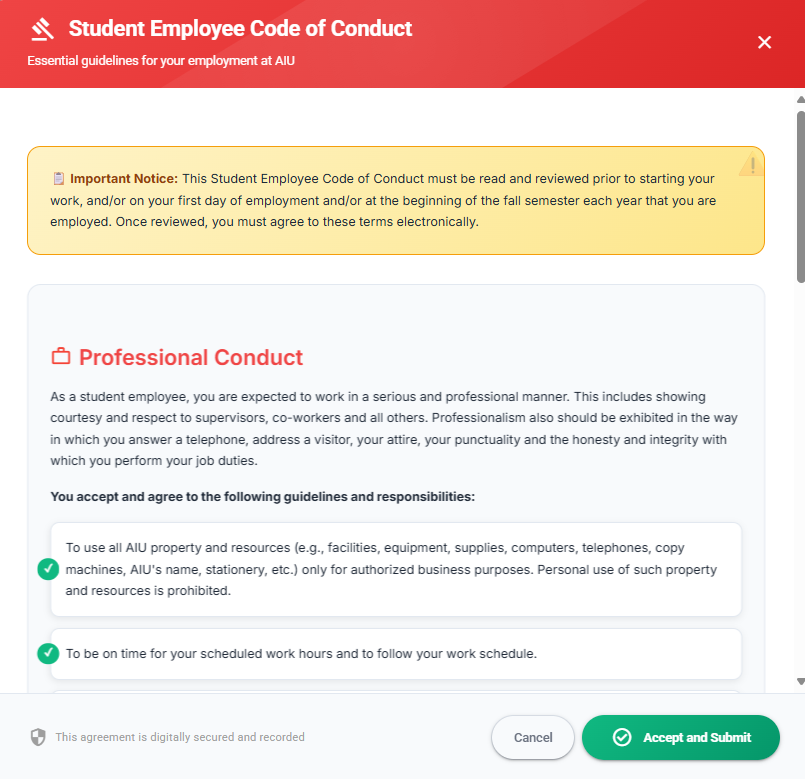
🚨 Important Notice
This Student Employee Code of Conduct must be read and reviewed prior to starting your work, and/or on your first day of employment and/or at the beginning of the fall semester each year that you are employed. Once reviewed, you must agree to these terms electronically.
Professional Conduct
As a student employee, you are expected to work in a serious and professional manner. This includes showing courtesy and respect to supervisors, co-workers and all others. Professionalism also should be exhibited in the way in which you answer a telephone, address a visitor, your attire, your punctuality and the honesty and integrity with which you perform your job duties.
📝 Your Responsibilities
You accept and agree to the following guidelines and responsibilities:
-
Property & Resources: To use all AIU property and resources (e.g., facilities, equipment, supplies, computers, telephones, copy machines, AIU's name, stationery, etc.) only for authorized business purposes. Personal use of such property and resources is prohibited.
-
Punctuality: To be on time for your scheduled work hours and to follow your work schedule.
-
Communication: To notify your supervisor as soon as possible if illness or other circumstances prevent you from working during your scheduled work hours.
-
Time Sheets: To accurately complete your time sheets. Reporting false work hours will result in immediate termination of your employment.
-
Professional Attire: To report to work in attire that is neat, clean and appropriate for the particular job that you hold. You should consult with your supervisor if you have any questions about appropriate work attire.
-
Substance-Free Workplace: In accordance with AIU's Alcohol and Drug-Free School and Workplace Policy, to refrain from working while under the influence of illegal drugs or alcohol.
🔒 Confidentiality Requirements
As a student employee at Asia-Pacific University ("AIU"), you may have access to various types of restricted use and confidential information in the course of your work. Examples include, but are not limited to:
- Financial Information
- Student Records
- Contact Information
- Donor Information
⚠️ Critical Warning
Under no circumstances are you permitted to release any restricted use or confidential information to any unauthorized person, including friends, outside callers, or other university employees without proper authorization. This includes sharing information verbally or in writing through any medium including email, social media, blogs, or message boards.
Student employees may be authorized to access such restricted use or confidential information as a condition of employment to the extent necessary to perform their duties. However, you are required to protect against unauthorized access to or disclosure of such information.
Disclosure of confidential information is a serious offense and may lead to disciplinary action pursuant to the Code of Student Conduct and/or termination of employment.
📝 Legal Agreement
By accepting these terms electronically, you acknowledge and understand that your employment with AIU is at will and can be terminated by AIU at any time. You further agree to respect and follow this Code of Conduct and to protect against unauthorized access to or disclosure of restricted use or confidential information.
Note: By clicking "Accept and Submit" below, you are electronically acknowledging and agreeing to these terms, which serves as your digital signature for this agreement.
Status Indicators
- Open: Ready to accept applications
- Closed: No longer accepting new applications
- In Progress: Applications under review
The system automatically prevents applications to closed positions and provides real-time feedback on your submission status.