Real-Time Student Status Monitor
Overview
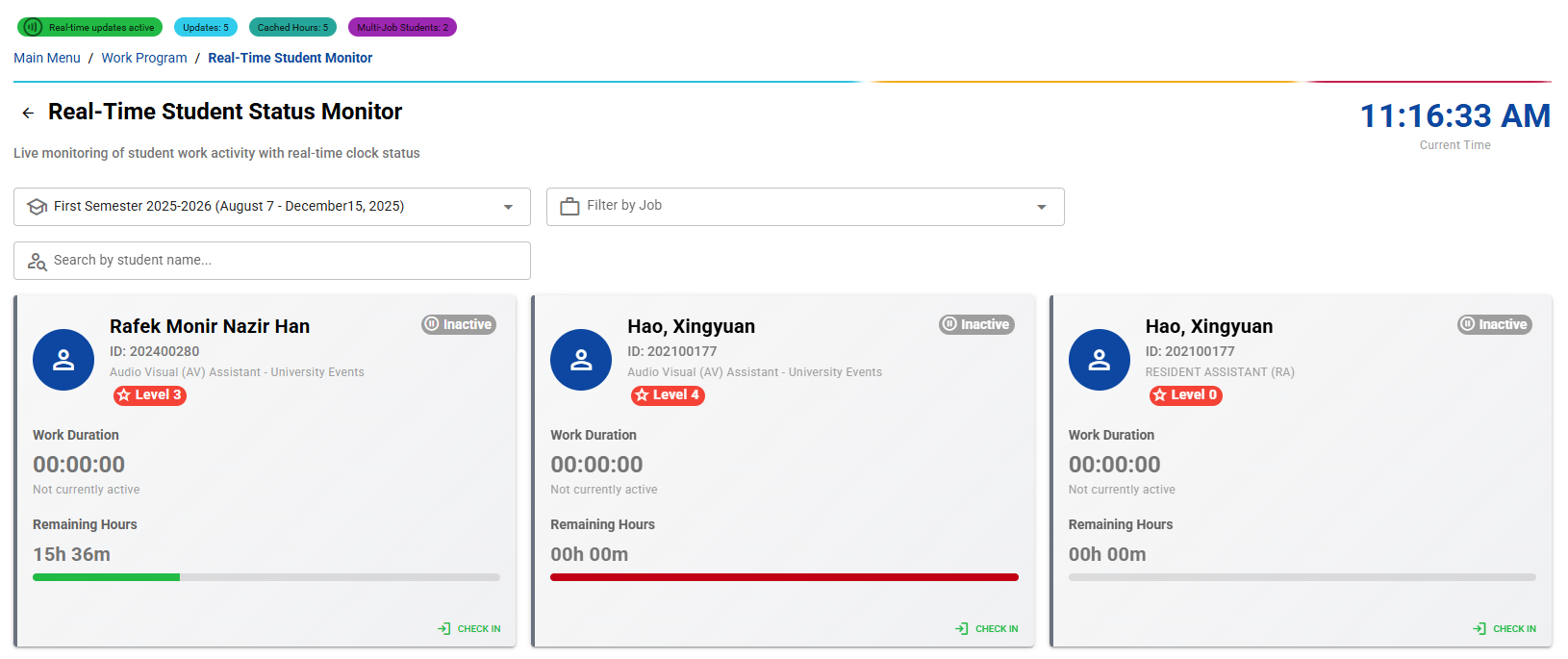
The Real-Time Student Status Monitor is an advanced live tracking system that provides supervisors with real-time visibility into student work activity. This powerful dashboard uses SignalR technology to deliver instant updates on student clock-in/out status, work duration, and remaining hours.
Getting Started
Access this page by clicking the "Realtime Monitoring" card on the Work Program Menu dashboard. The system automatically connects to real-time updates and displays the current semester's active students.
Page Layout and Real-Time Features
Connection Status Indicator
At the top of the page, monitor your real-time connection:
- Green Chip: "Real-time updates active" - Live connection established
- Red Chip: "Offline mode" - Connection lost, data may be outdated
- Debug Information: Additional chips show system metrics for monitoring
Live Dashboard Header
- Current Time Display: Large digital clock showing real-time
- Auto-Refresh: Page updates every 30 seconds automatically
- SignalR Integration: Instant notifications for student status changes
Advanced Filtering System
Comprehensive Filter Options
Three-tier filtering system for precise student monitoring:
Semester Selection
- Current Semester: Automatically selects current academic semester
- Historical Data: Access previous semesters for comparison
- Auto-Load: Data refreshes when semester changes
Job Title Filter
- Dynamic Options: Populated from actual job assignments
- Multi-Position Students: Shows all positions for students with multiple jobs
- Real-Time Updates: Filter options update as data changes
Student Name Search
- Live Search: Results appear as you type (300ms debounce)
- ID Support: Search by student ID or name
- Fuzzy Matching: Flexible search algorithm
Filter Management
- Clear All Filters: One-click reset to show all students
- Results Counter: Shows filtered vs. total student count
- Smart Indicators: Visual feedback for active filters
Real-Time Student Status Cards
Individual Student Cards
Each student is displayed in a comprehensive status card with:
Student Information Section
- Student Avatar: Visual representation with person icon
- Full Name: Student's complete name
- Student ID: Unique identifier
- Job Title: Current work position
- Level Badge: Skill level (1-4) with color coding
Real-Time Status Indicators
Dynamic status system with four states:
Active Status (Green)
- Indicator: Green chip with "Active" label
- Work Duration: Live countdown timer showing HH:MM:SS
- Progress Bar: Visual representation of hours used vs. limit
- Check-In Time: When the student started working
Inactive Status (Gray)
- Indicator: Gray chip with "Inactive" label
- Duration: Shows "00:00:00" when not working
- Status: "Not currently active" message
- Ready State: Available for check-in
Overtime Alert (Orange)
- Indicator: Orange chip with "Overtime Alert" label
- Warning: Student approaching weekly hour limit
- Duration: Live timer showing extended work time
- Action Required: Supervisor attention needed
Over Limit (Red)
- Indicator: Red chip with "Over Limit" label
- Critical State: Student exceeded weekly hour allowance
- Immediate Action: Requires supervisor intervention
- Auto-Alerts: System notifications for critical states
Work Duration Display
- Live Timer: Updates every second for active students
- Format: HH:MM:SS display with leading zeros
- Start Time: Shows when work session began
- Precision: Accurate to the second
Remaining Hours System
Advanced calculation system showing:
Smart Calculation
- Weekly Limits: Based on approved hours per week
- Used Hours: Includes previously logged time
- Current Session: Adds live work duration
- Multi-Job Support: Accounts for students with multiple positions
Backend Integration
- API Calls: Real-time data from backend services
- Caching System: Optimized performance with intelligent caching
- Error Handling: Graceful fallback for network issues
Visual Progress Indicators
- Linear Progress Bar: Visual representation of hour usage
- Color Coding: Green (safe), Orange (warning), Red (critical)
- Percentage Display: Shows completion percentage
Supervisor Control Functions
Force Check-In/Check-Out
Powerful administrative controls for immediate action:
Force Check-Out
- Emergency Stop: Immediate check-out for any student
- Confirmation Dialog: Prevents accidental actions
- Supervisor Remarks: Automatic logging of forced action
- Instant Update: Real-time status change across system
Force Check-In
- Manual Start: Begin work session for students
- Administrative Override: Supervisor-initiated sessions
- Audit Trail: Complete logging of manual interventions
- Validation: Ensures proper session management
Interactive Actions
- Click-to-Expand: Cards provide detailed information
- Quick Actions: Direct access to force functions
- Context-Sensitive: Actions based on current student status
Student Details Modal
Comprehensive Student Information
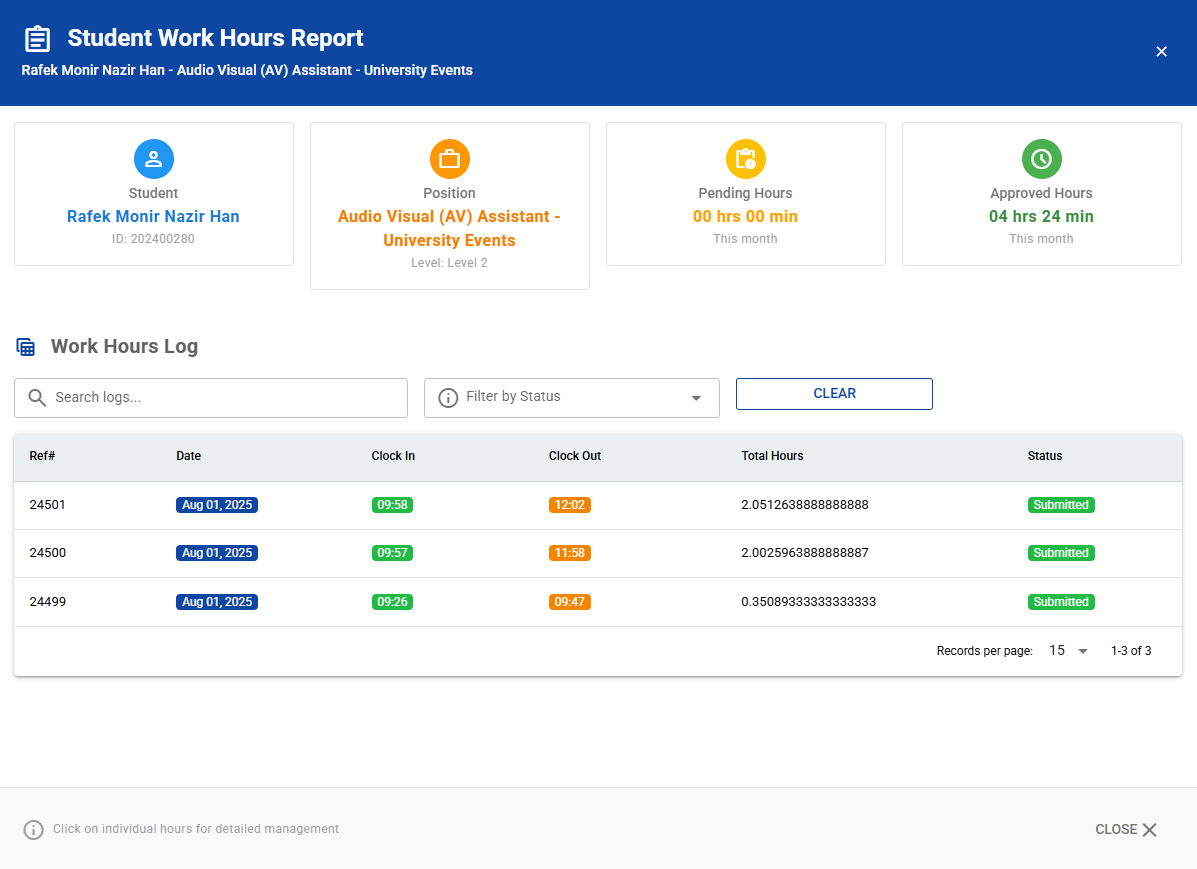
Full-screen modal with detailed student work history:
Fixed Header Section
- Student Name: Full identification
- Job Position: Current work assignment
- Navigation: Close button and breadcrumb information
Summary Statistics Cards
Four-card layout showing:
Student Information Card
- Full Name: Complete student identity
- Student ID: Unique identifier
- Visual Avatar: Professional presentation
Position Information Card
- Job Title: Current work position
- Level Assignment: Skill level classification
- Department: Work assignment details
Pending Hours Card
- Current Month: Unprocessed work hours
- Format: Hours and minutes display
- Status: Awaiting supervisor approval
Approved Hours Card
- Validated Time: Supervisor-approved hours
- Monthly Total: Current month's approved work
- Financial Status: Ready for payroll processing
Work Hours Log Table
Comprehensive table with advanced features:
Column Structure
- Reference Number: Unique log identifier
- Date: Work session date with badge display
- Clock In/Out: Start and end times with color coding
- Total Hours: Calculated work duration
- Status: Current approval status with badges
Advanced Filtering
- Search Function: Free-text search across all fields
- Status Filter: Filter by approval status
- Clear Options: Reset filters with one click
- Real-Time Results: Instant filtering as you type
Data Presentation
- Color-Coded Badges: Visual status indicators
- Time Formatting: Consistent time display
- Sortable Columns: Click headers to sort data
- Pagination: Handle large datasets efficiently
Real-Time Notifications System
Advanced real-time communication:
Instant Updates
- Clock Status Changes: Immediate notification of check-in/out
- Status Alerts: Real-time student status changes
- System Events: Auto-check-out and administrative actions
Enhanced Notifications
- Student Actions: Detailed information about student activities
- Supervisor Alerts: Critical status notifications
- Action Context: Specific job and time information
Notification Types
- Check-In Alerts: Green notifications for work start
- Check-Out Alerts: Blue notifications for work end
- Auto-Checkout Warnings: Orange notifications for system actions
- Critical Alerts: Red notifications for issues requiring attention
Best Practices and Workflows
Daily Monitoring Routine
- Check Connection: Verify real-time status indicator
- Review Active Students: Monitor currently working students
- Watch for Alerts: Pay attention to overtime warnings
- Handle Critical States: Address over-limit situations immediately
- Use Details Modal: Deep-dive into specific student issues
Emergency Procedures
- Force Check-Out: Use for students who forgot to clock out
- Overtime Management: Monitor and prevent excessive hours
- System Issues: Use force functions when technical problems occur
- Documentation: All supervisor actions are automatically logged
Efficiency Tips
- Filter Usage: Use job and name filters for focused monitoring
- Real-Time Alerts: Rely on notifications for immediate action items
- Batch Processing: Handle multiple students efficiently
- Regular Monitoring: Check dashboard periodically throughout the day
This real-time monitoring system provides complete oversight of student work activities while maintaining system performance and reliability through advanced caching and error handling mechanisms.